Nam Vu Personal Site
  • Home
  • My Works
  • My Photos
  • My Blog
  • Pet Projects
  • Freebies
  • About
Nam Vu Personal SiteNam Vu Personal SiteNam Vu Personal SiteNam Vu Personal Site
  • Home
  • My Works
  • My Photos
  • My Blog
  • Pet Projects
  • Freebies
  • About
February 21, 2026

Introducing SHRIMP – a Web-based raster image editor inspired by GIMP/Gravit/Photopea

  • Posted By : Nam Vũ/
  • 0 comments /
  • Under : AI Apps, Side Projects

Hey folks, I’d like to introduce to my latest work SHRIMP (Simple Hi-Res Image Manipulation Program). The name is inspired by the GIMP (the GNU Image Manipulation Program)
TL;DR you can find it here:

SHRIMP Editor

(you need to bring your own AI endpoints to enable image generation features, Antigravity is a free option at the time of this writing)

It is a full featured image editor that works inside your browser, like PhotoPea. Coded it in a week during 2026 Lunar New Year. Spent a week at the inlaws with my old laptop and VSCode. Most of the features in this editor were GPU-accelareted via WebGL, made possible thanks to Pixi.js library (in fact I briefly considered calling it Pixi.js Image Manipulation Program before quickly realizing that name wouldn’t work in today’s work)

This project tracks all the way back to 2020, I was locked down during Covid-19 and had a lot of time on my time, so I started a Figma project called NeoGIMP as a self-assigned study project to improve the GIMP’s notorious UI. It was a project I was really proud of. I will share the Figma project on community site as soon as I finish cleaning it up.

December 29, 2024

Created yet another app

  • Posted By : Nam Vũ/
  • 1 comments /
  • Under : My Apps, Side Projects

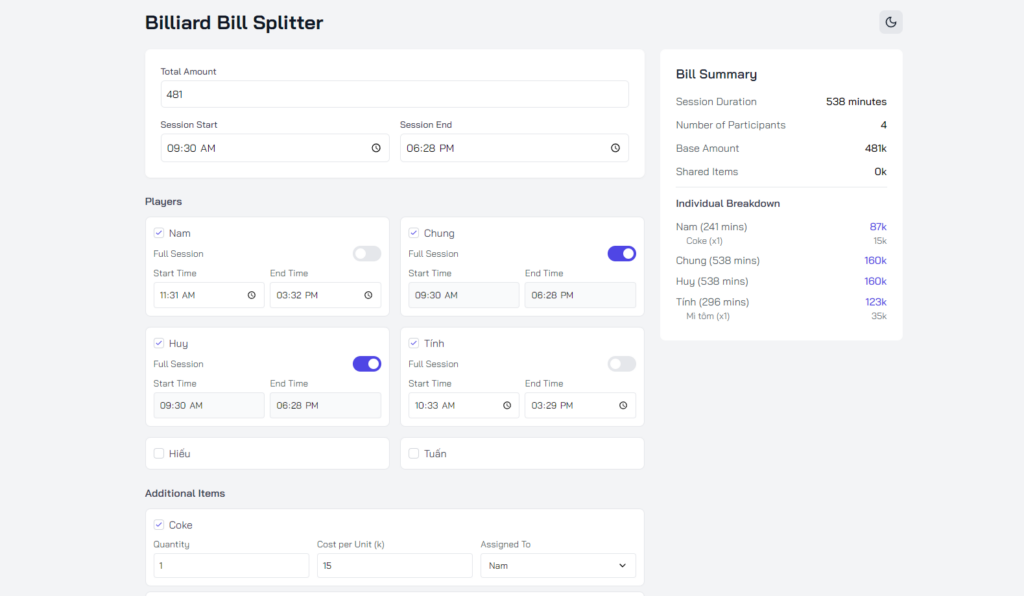
Just made yet another an app to split the bill between my group of pool club buddies.

image 6
Created yet another app 2

Just a year earlier it would take a non-developer like me weeks to put together a tool like this. Today I was able to create a full fledge app with proper tailwind implementation, light/dark mode support with custom Google fonts, and deploy to Cloudflare Pages through Wrangler API, all within the span of half a day’s work including a bunch of back & forth iteration with Claude.

What a time to be alive!

Check it out:

Live Demo
Github

P.S: (player names are currently hard coded because this is for my personal use, if you’re interested in a version with dynamic player setup, let me know in the comments down below)


December 22, 2024

I made a free website to screenshot tool

  • Posted By : Nam Vũ/
  • 0 comments /
  • Under : Side Projects, My Apps

So after my first encounter with creating a note taking tool programmatically using AI agents, I was inspired to create another tool, this time entirely from scratch, not forking off someone else’s work. This was actually a tool I created earlier, utilizing Puppeteer to create screenshot of websites at specified resolutions, which is something a designer like myself need to do quite often.

It was originally a CLI only tool, but with the help of the recently made free CoPilot, I was able to put together a WebUI for it using Tailwind CSS and a bunch of JS. Here’s how it look:

Check out the Github here: https://github.com/vnt87/puppeteeer-capture

Now if you came here from r/selfhosted, I know what you want, a docker image that you can deploy on your own hardware. I got you covered, just use this docker-compose.yml:

services:
  app:
    image: ghcr.io/vnt87/puppeteeer-capture:sha-1a9e996
    ports:
      - "5432:3000"
    volumes:
      - ./screenshots:/app/screenshots
    environment:
      - NODE_ENV=production
      - PUPPETEER_ARGS=--no-sandbox,--disable-setuid-sandbox

Recent Comment
  • Moke on Cursor stole your ‘code’ command? Here’s how to revert it: “Thanks!” Aug 4, 20:31
  • junior pro on Cursor stole your ‘code’ command? Here’s how to revert it: “Thanks” Jun 9, 21:04
  • User on Cursor stole your ‘code’ command? Here’s how to revert it: “Useful. Thanks” May 8, 21:39
  • Super on Cursor stole your ‘code’ command? Here’s how to revert it: “Thanks” Apr 11, 19:13
  • Hyper on Cursor stole your ‘code’ command? Here’s how to revert it: “Thanks” Mar 12, 15:39
Categories
  • AI Apps
  • AI Art
  • Design
  • Development
  • DIY
  • Freebies
  • GameDev
  • Home Networking
  • Linux
  • Music
  • My Apps
  • Randomness
  • Rants
  • Side Projects
  • Songs I like
  • Tips & Tricks
  • Tributes
  • Uncategorized
  • UX Design